Slider

Flag Counter

How to Avoid Online Job Scams

Saturday, July 20, 2013 | 0 comments

There are as many scams as real job openings online - sometimes it seems like more. How can you tell the difference between online job scams and legitimate job openings?

It can be really difficult to tell the difference between what is real and what's a scam. Scammers are getting more sophisticated and coming up with new ways to take advantage of job seekers all the time.

Create 'After the jump' summaries

Monday, July 8, 2013 | 0 comments

After the Jump is a feature which lets you create expandable post summaries in your blog posts, so longer posts appear as an intro with a link to Read More.
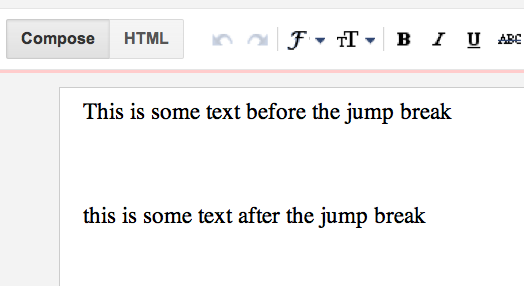
Creating jump breaks in your blog posts can be easily done right from the Post Editor, without the need for any HTML changes. First, decide where in the post you want to create the jump break, and place your cursor in that position:

The text where you want to jump
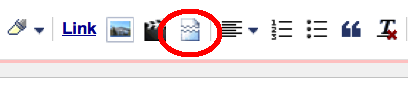
Once your mouse cursor is placed at the jump point, simply click the Insert Jump Break toolbar icon:

Jump icon in the toolbar
Clicking the icon will insert a grey bar at the cursor point, illustrating where in the post your break will appear. The bar can be dragged though, so you can always re-position it after insertion.

Gray jump line
Once you decide on the jump break's location within the post, you're ready to publish your post. After publishing, you'll notice that the Read More link is placed where you set the jump break. Clicking on the Read More link will then display the full text of the post.
If you feel like changing the Read More text to your own custom phrase, you can easily do this from the Layout tab. Click Edit on the Blog Post widget, and then change the Post page link text to whatever you'd like.
The Jump Break feature doesn't change how your post appears in your feed. You can configure post feed options by going to Settings | Basic | Other, and editing Allow Blog Feed.

Showing ads between your posts

| 0 comments

If you want to show ads between your posts, first go to your Layouts tab. Then, in the "Blog Posts" section, click on "Edit." A pop-up window will appear with options to configure your blog posts. Check the box next to "Show Ads Between Posts." (Note: You must be signed up for AdSense before you can check this box.)
Once you check this box you'll see the configuration options for your ads. You can then select how often you would like ads to be shown after your posts.
For example, if you want ads to be displayed after every post, select "1" from the drop-down menu (please note that AdSense policy limits you to a total of 3 ad units per page, and Blogger will automatically prevent you from going over this limit). You can then select your ad format and colors. Once you have finished configuring your ads, click on the orange "Save" button.

How to Make Money on YouTube: 'Elementary'

| 0 comments


If Dr. John H. Watson asked Sherlock Holmes to draw large conclusions about the YouTube Partner Program from small observations about these recent announcements, the consulting detective would probably reply, "Elementary."

YouTube has made a number of recent announcements aimed at helping more than a million YouTube Partners from over 30 countries around the world earn more money from thousands of advertisers who are placing TrueView in-stream ads inside Partner videos. And you don't need to be a member of the Baker Street Irregulars to know, "The game's afoot."
Two weeks ago, YouTube said it will bring advertisers into its Partner Program, which provides video content creators with resources and opportunities to improve their skills, build fan bases, and earn more money. YouTube has already invited American Express, General Electric, Johnson & Johnson, and PepsiCo to participate in the initial pilot program for this new partnership endeavor. The program will kick off in September with a week-long workshop in Los Angeles and the plan is to have 100 brand content partners by the end of 2014.
Lucas Watson, YouTube's VP of Video Online Global Sales, told Anthony Ha of TechCrunch, "By inviting advertisers into our partner program, we hope to give them access to resources and expertise that will help them develop even more compelling and authentic content on YouTube."
A week ago, YouTube released a short trailer announcing the launch of the YouTube Pro Series for emerging content creators. It provides the latest advice from top YouTube Partners on building a sustainable career on YouTube and beyond.

Sherlock Holmes and Dr WatsonCarla Marshall of ReelSEO observed, "YouTube has previously offered creators guidance via the Creator Playbook and through their online Creator Academy but the new venture looks like it might be more business orientated, offering suggestions how to best monetize a growing audience and cope with the demands and challenges that a successful channel makes on a creator."
And this week, the YouTube Creator Blog shared a playlist from the first YouTube Pro Series. In four videos, Dane Boedigheimer of Annoying Orange, Spencer Griffin of College Humor, Kurt Hugo Schneider, and Elle Walker of WhatsUpELLE talk about "Working with Advertisers." They give advice on pitching an idea, what to include in a contract, how to price a deal, as well as staying true to your audience through the process.
What deductions can we make from what we've observed?
In April 2012, YouTube had more than 30,000 partners in 27 countries around the world. And hundreds of partners were making six figures a year.

Then, the YouTube team updated its partner eligibility requirements across 20 countries where the Partner Program had been launched. Content creators in these countries could quickly become YouTube Partners simply by enabling their YouTube accounts, and monetizing at least one of their videos.
Today, YouTube has more than a million partners from over 30 countries around the world earning money from their YouTube videos. And thousands of channels are making six figures a year.
But, the significant growth in the number of top YouTube Partners who are making six figures a year masks the dramatic growth in the number of YouTube Partners who aren't making that kind of money. There are now close to a million partners who are still trying to build a sustainable career on YouTube and beyond.
That is a large population – larger than the population of Detroit, Liverpool, or Vancouver.
So, the number of advertisers who are using TrueView in-stream ads needs to increase significantly and/or the amount of money they spend on YouTube advertising needs to increase dramatically, or an awful lot of poor YouTube Partners are going to face a hard decision this winter: remain starving artists or look for another day job.
Now, in the long run, this current storm and/or tempestuous season will pass.
The number of video ad views on Google Sites, driven primarily by video viewing at YouTube.com, reached 2,553,208,000 in May 2013, according to comScore Video Metrix. That's up significantly from 1,385,273,000 in May 2012.
So, in the short run, YouTube is providing video content creators with as many resources and opportunities to improve their skills, build fan bases, and earn more money as it can muster.
Now, imagine that Inspector Gregory of Scotland Yard asked Holmes, "Is there any other point to which you would wish to draw my attention?" The consulting detective would probably reply, "To the curious incident of the dog in the night-time."
But, Gregory would probably observe, "The dog did nothing in the night-time." And Holmes would probably point out, "That was the curious incident."
So, what is the dog that didn't bark in this current storm and/or tempestuous season?
There are more than a million advertisers using Google ad platforms, the majority of which are small businesses. And there is already a program, Google Engage for Agencies, that helps search engine marketing agencies, web development firms, and online marketing companies master the art of online marketing so they can help their small and medium-sized business clients succeed online.
Eligibility for the program is currently limited to agencies and clients based in the U.S. and Canada. And most of the program's online training courses, webinars, and events are focused on AdWords.
So, why hasn't Google updated its partner eligibility requirements in over 30 countries around the world and/or added more online training courses, webinars, and events focused on what Google calls AdWords for video and/or what YouTube calls TrueView ads?
That is the curious incident. That is the dog that hasn't barked ... yet.
So, what will Google and/or YouTube probably announce next? The answer is: "Elementary."

7 Tips to Increase Your AdSense Revenue

Sunday, July 7, 2013 | 0 comments

Making money online is one thing, making money online that allows you to do whatever you want is a completely different story. We all dream of staying home and money going Cha Ching! in the bank. If only it were that easy.
We all want to achieve this dream, one way or another, but for those of you currently running a blog (especially with AdSense) you want to make a lot of money, and now! While we can’t guarantee you will make that money with your blog, we can provide you with some tips on how to increase your AdSense Revenue.
1.      Location – placing ads on your site is a fairly simple process. You are given code and you add it accordingly to your site. You can add it to the top, site, bottom, or pretty much anywhere you can add advertisement. Our recommendation is to add it at the top. Near your website name/logo. It’s a great place to see it and easy to click on.
2.      Multiple Ads – if the top isn’t an ideal location, then no worries. You can add an AdSense ad to other locations, on either side of your site, or even at the bottom. While it may be easiest to add it at the top, some people don’t like clicking those but prefer those at the bottom or even on the side. You want to give readers a choice, and adding several different ads (in various locations and sizes) you are giving them the ability to choose which ad to click.
3.      Keyword Focused Ads – Google is great in the ability to display ads related to the keywords you use in your posts. If you talk about oil filters for jet engines, you will most likely see ads related to that niche. You want to make sure to use keywords in your posts, but remember not to make it keyword heavy (your post still needs to make sense).
4.      Traffic Increase – the equation is simple more traffic = more clicks. You’ll want to generate traffic in any way you can (white hat methods). Be sure to network using the various social networking sites, and pass out business cards where you can. Get entrenched in your niche, and get personal with those involved. It’s a great way to generate traffic. Also be sure to check out our post on how to generate traffic to your site/blog.
5.      Filtered Ads – Google is constantly amazing people. The great thing about their advertising program is that you can actually filter the ads specific to your niche. If you are sick of seeing ads for shoes, when your niche is airplane seating, then be sure to use the filtering settings. You can select what types of ads you want to have displayed (up to 200 URLS).
6.      Create Multiple Sites – do you currently have one site running? If it’s earning you a great income then no need to continue. If you are struggling and can afford additional time (and have other great ideas for niche specific sites), then you may want to think about setting up an additional blog (or 10 more but you will be quite busy). You will have one AdSense account, but traffic coming from various niches and that means more clicks (and that means more money).
7.      Fluidity – fluidity refers to two different things. First you want to make sure that the ads you are using flow with your site. You don’t want to have colors opposite to your site. You want it all to blend in together. The second refers to ad placement within your posts. If you are creating text heaving posts, you will want to break it up, placing an ad within it, is a great way to provide some rest for the reader (and it also helps make your content more scannable).
That’s it folks, that’s 7 tips to increasing your AdSense revenue. But before we let you go, here is one more important to keep in mind.
  • Test It Out – like many experts will tell you, sometimes just testing out your AdSense placement will help you increase your income. This includes performing many of the suggestions we have made above. Look at adding various sized ads, in different locations, using both text and image ads, with different colors, on multiple sites, with various keyword focused ads.
 
© Copyright 2010-2011 Learn To Earn All Rights Reserved.
Template Design by Herdiansyah Hamzah | Published by Borneo Templates | Powered by Blogger.com Download This Template From Coolbthemes.com..